| | | RM to AVI DVD VCD SVCD MPEG Converter | Featured |  | |
| | Convert rm/rmvb/ram to DVD | 1: Convert rm/rmvb/ram to dvd with AVOne - RM to AVI/DVD/VCD/SVCD/MPEG converter Note: a. Three kinds of files are created by the software. ("*.mpg" is a mpeg file in DVD specification, it contains Video and Audio; "*.m2v" is a MPEG2 video file, it only contains video; "*.mp2" is a audio file in Layer 2 format, it only contains audio.) b. The .m2v and .mp2 file will be used in the following steps. | 2: Create *.VOB, *.IFO with IfoEdit (IfoEdit is a freeware) or get from Digital Digest. Launch IfoEdit software, you will see following interface. - Click DVD Author/Author New DVD.
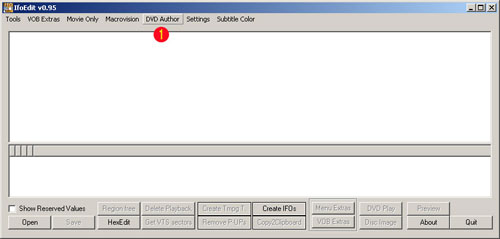
- Click the button to open your Video file, which has been created by the software (*.m2v file).
- Click the button to open your Audio file, which has been created by the software (*.mp2 file)..
- Select a destination, any drive root with the folder name VIDEO_TS. Be sure that you have enough hard disk space, if your mpeg and audio files are 4.37 GB it requires same free space. The folder name VIDEO_TS must be capital letters.
- Click OK button, Ifoedit will start generating the DVD structure(vob and ifo files), it will take some time if you are creating a full DVD.
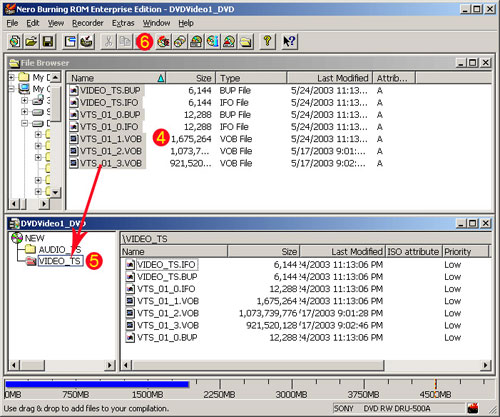
| 3. How to burn DVD onto a DVD-R / DVD+R / DVD-RW / DVD+RW with Nero 6 To get Nero 6 software, please visit here. Launch Nero. Please click Wizard button, you will see the UI below. 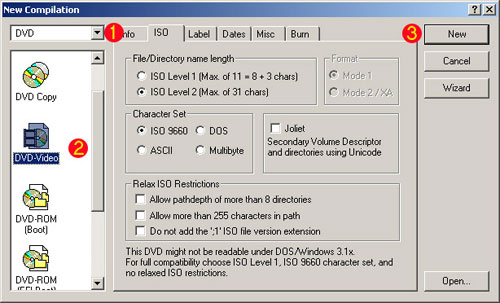
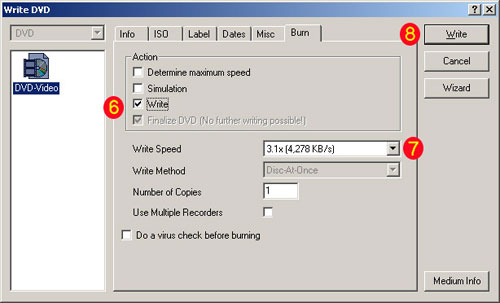
- Mark the check box of Write.
- Select Write speed, lower may work better if you get problem on playing the DVD.
- Click Write button.
|
|
| |
| | Highlight |  | | Video
Converter | | WinAVI Video Converter is software
for video conversion. By using our product, users are released from the limitations
and difficulties of video formats. It can support almost all formats of video
including AVI, MPEG1/2/4, VCD/SVCD/DVD, DivX, XVid, ASF, WMV, RM, QuickTime MOV,
Flash SWF. Also, it allows you to burn to VCD/SVCD/DVD. |
| 
DVD-Cloner
- Perfect 1:1 DVD copy
| | | 

 |
| Just
In | |
iPad to Mac Transfer - is capable of copying video and audio files from iPad
to your Mac for your backup, and also backing up iPad movies and music to iTunes
library, which also transfers videos/music/photos on your Mac to iPad without
iTunes. Applies to iPad Wi-Fi, iPad Wi-Fi+3G, iPad 16GB, iPad 32GB, iPad 64GB,
iPhone, iPhone 3G, iPhone 3GS, iPod touch, and many others. | | | |
iPad Mate for Mac - With ImTOO iPad Mate for
Mac, you can copy movies and music between iPad and Mac without iTunes, as well
as sync iPad files to iTunes. As a DVD to iPad converter and iPad video converter,
it can also rip CD/DVD discs and convert videos/audios/ISO images/IFO folder to
iPad media files. The Mac iPad manager fully supports iTunes 9.1 and all iPads,
iPhone and iPod including iPad Wi-Fi, iPad Wi-Fi+3G, iPad 16GB, iPad 32GB, iPad
64GB, iPhone types. | | | | Video
to DVD Converter for Mac - provides you with
the quickest and the easiest way to convert most video files to DVD movies, ISO
image files or DVD folders. ImTOO Video to DVD Converter for Mac also features
comprehensive movie customization functionalities: create DVD menus, clip movie
segments, crop the movie image frame, add artistic effects, attach watermarks,
add multiple subtitles and soundtracks, amongst other great features. | | | |
Movie Maker for Mac - provides easy and fast
solution to turn videos on Mac into movies that you can share on Web or multiple
popular devices. The Mac movie maker contains features such as transitions, artistic
effects, watermarks, and audio track. The supported input videos include: MTS,
M2TS, HD AVI, HD MPEG-2/4, HD VOB, HD WMV, AVI, 3GP, M4V, MPEG, MP4, RM, RMVB,
FLV, DV, VOB, SWF, MPV, MOV, QT, H.261/H.264, DAT, ASF, WMV. Make movies from
camcorder, HD & common videos on Mac. | | | |
Ringtone Maker for Mac - is the best ringtone
creator and converter for Mac and mobile users to make your own ringtones from
favorite music or videos. It can support all popular audio and video formats,
such as AVI, MPEG, WMV, DivX, MP4, H.264/AVC, MKV, RM, MOV, etc., and audios such
as MP3, WMA, WAV, RA, M4A, AAC, AC3, OGG, and so on. In addition, you can also
trim any part of a media file and make it your ringtone, create ringtone fade-in
and fade-out effects, and create ringtones with millisecond precision. | | | | PodWorks
for Mac - is a Mac iPod transfer software tool
to transfer iPod files from iPod to Mac, iPod to iTunes, and Mac to iPod easily,
and even directly copy DVD movies and incompatible video/music files to iPod.
You can also copy files from iPhone to Mac, iPhone to iTunes and Mac to iPhone,
and transfer files among multiple iPods and 1 iPhone. Transfer files from iPod
to Mac, iPod to iTunes, and Mac to iPodConvert DVD movies, videos, and music to
iPod-format and transfer directly to your iPod or iPhone. | | | |
iPhone Works for Mac - is an easy-to-use transfer
tool for iPhone lovers on Mac. It performs as both iPhone Video Transfer and iPhone
Music Transfer. You can quickly transfer music, movies and photos between iPhone
and Mac, synchronize iTunes with your iPhone directly, convert and copy videos,
audios and CDs/DVDs to iPhone. This program is so great! You can put all your
DVDs, videos onto your iPhone directly without iTunes. And also I can backup your
iPhone files to your new MacBook. | | | |
HD Video Converter for Mac - Help you convert
HD videos to general videos with high image and audio quality on Mac OS. ImTOO
HD Video Converter for Mac is a powerful Mac HD video converter to convert HD
video on Mac OS. It brings you powerful function to convert HD video to SD (Standard-Definition)
videos. The Mac HD video converter supports most of HD video formats such as AVCHD
(mts, m2ts), H.264/AVC, MPEG-2 (ts), DivX, HD WMV, MPEG-4 and Quick Time. | | | |
YouTube to iPod Converter for Mac - is the easiest
and best solution for you to download videos from YouTube.com and convert them
to iPod MP4/MPEG-4. Besides, it can convert FLV files to your iPod. The built-in
YouTube video browser lets you easily and quickly search and find the video you
want to download. It supports proxy server customization. | | |
|