| | Pocket DVD Wizard
| Featured |  | |
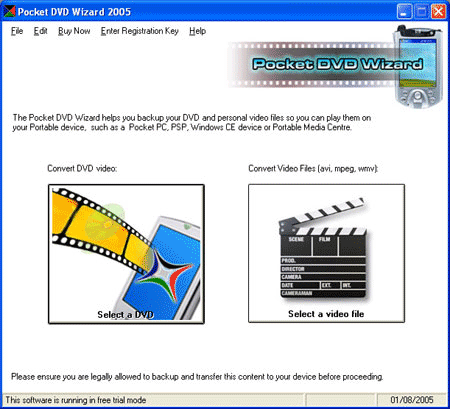
| | Watch your DVD videos on your FlashTrax XT We were asked to add this device by a user on a forum called MoneySavingExpert.com who purchased the device after a tip on this forum that they were available at a discount from a local office supply store. We managed to get hold of one, and added it to the software in version 4.6.1 (download here). The FlashTrax may not look as slick as some of its rivals, such as the Archos, but at a quarter of the price, and with excellent performance it makes an ideal video player, and it far more 'kid proof' than most other media players we have tested, and it is very easy to use. We have added full support for the XT device so you can convert both DVDs and videos (DivX) for it. The conversion may also work for other FlashTrax devices, although this is not currently tested. How to convert DVD and videos for the FlashTrax XTSimply download and install the free trial version of the Pocket DVD Wizard, this will put a Pocket DVD Wizard icon on your desktop. Start the software, then click the 'Select a DVD button'. Choose the DVD you want to convert and then go through the easy, step by step Wizard. When you are asked for the device you want to convert the DVD or video for, select the FlashTrax XT option in the device selection box. The Wizard will then create a file you can play (and that has been optimized for) on your XT. To copy the file to your XT, simply connect it to your computer using the supplied USB cable, it should then appear as an extra drive in the Windows file manager. Drag (or copy and paste) the new video file into the PVR folder on your FlashTrax XT, then disconnect the USB cable and play the video file from the XT hard disk. Software Highlights... - The Pocket DVD Wizard works (unlike some other products!)
- All you need is a PC running Microsoft Windows that can play a DVD using Media Player.
- With a 40gb disk, you could fit over 100 full length movies on a single FlashTrax.
- The Pocket DVD Wizard works with your other devices too, such as a PSP or iPod Video
- The free trial version lets you 'try before you buy. (click here for the download)
- 'Black bars' at the top and bottom of the picture can be removed from standard widescreen videos.
- You can record multiple TV episodes to separate files in one go.
- Enhance the video brightness during the conversion.
- Select high speed, high quality or a balanced output - the choice is yours.
- Parlez vous Francais? Not a problem, alternate languages and subtitles are fully supported.
- Using the Wizard interface it's as easy as 1-2-3-done!
Tried and tested with the FlashTrax XTWhen you buy the Pocket DVD Wizard you are buying the very best because it has been tried and tested, and optimized from your FlashTrax or any other mobile device you own such as an iPod video or Playstation Portable. When we can get hold of a device, we do so, and do not just work from 'technical specifications' as devices do vary, and while a conversion may work when working from the specifications alone, it would not be optimised for the device. You do not need to learn about different codecs, profiles or bit rates, forget about screens that vary in size and brightness or the audio capabilities of your device, we have already done all that for you. Simply select the device you own from the drop down box using the Wizard step by step interface. Its easy because its been designed that way. Get the latest FlashTrax XT FirmwareIf you have any problems with the playback, it is likely your player has an older firmware. You can download the latest firmware for the XT from SmartDisk here. Other Devices Supported by the Pocket DVD WizardWe are adding support for new devices all the time and as upgrades to the latest version are free, if in six months time you buy a new video player for your kids, or buy a new Pocket PC or Palm and would like to watch video on that, you won't need to buy a new piece of DVD conversion software for it. Some of the other devices supported include - Creative Zen Vision:M
- All standard and VGA Pocket PC devices
- Palm OS devices (including Treos)
- Sony Playstation Portable (PSP)
- Archos media players (e.g. AV700, AV500)
- Windows Portable Media Centers (eg Creative Labs Zen PMC / iRiver PMC)
- Windows smart phones (eg iJam / MPX) and 3GP video cell and mobile phones
- Windows CE handheld player.
- Apple iPod Video
- and more. Download the latest trial version for the full list.
If there is a device we do not currently support, but you would like us to add please let us know. The trial version of the Pocket DVD Wizard lets you to convert 5 minutes of DVD video free so you can see how easy the software is to use, and just how good the results are! Why not give it a free try now? |

| | Pocket DVD
| DVD to SmartDisk FlashTrax XT |
|
| | |  | RegNow Secure Ordering - 100% Secure Purchase | The order process is protected through a secure connection.Your personal data is encrypted and cannot be accessed by a third party. We do not record your credit card information. | | You can select the payment type such as credit card, switch/solo, bank/wire transfer, check, cash. |  |
|
| |
Pocket DVD , DVD to SmartDisk FlashTrax XT |
| |
| |
| | Highlight |  | | Video
Converter | | WinAVI Video Converter is software
for video conversion. By using our product, users are released from the limitations
and difficulties of video formats. It can support almost all formats of video
including AVI, MPEG1/2/4, VCD/SVCD/DVD, DivX, XVid, ASF, WMV, RM, QuickTime MOV,
Flash SWF. Also, it allows you to burn to VCD/SVCD/DVD. |
|  DVD-Cloner
- Perfect 1:1 DVD copy
| | | 

 |
| Just
In | |
iPad to Mac Transfer - is capable of copying video and audio files from iPad
to your Mac for your backup, and also backing up iPad movies and music to iTunes
library, which also transfers videos/music/photos on your Mac to iPad without
iTunes. Applies to iPad Wi-Fi, iPad Wi-Fi+3G, iPad 16GB, iPad 32GB, iPad 64GB,
iPhone, iPhone 3G, iPhone 3GS, iPod touch, and many others. | | | |
iPad Mate for Mac - With ImTOO iPad Mate for
Mac, you can copy movies and music between iPad and Mac without iTunes, as well
as sync iPad files to iTunes. As a DVD to iPad converter and iPad video converter,
it can also rip CD/DVD discs and convert videos/audios/ISO images/IFO folder to
iPad media files. The Mac iPad manager fully supports iTunes 9.1 and all iPads,
iPhone and iPod including iPad Wi-Fi, iPad Wi-Fi+3G, iPad 16GB, iPad 32GB, iPad
64GB, iPhone types. | | | | Video
to DVD Converter for Mac - provides you with
the quickest and the easiest way to convert most video files to DVD movies, ISO
image files or DVD folders. ImTOO Video to DVD Converter for Mac also features
comprehensive movie customization functionalities: create DVD menus, clip movie
segments, crop the movie image frame, add artistic effects, attach watermarks,
add multiple subtitles and soundtracks, amongst other great features. | | | |
Movie Maker for Mac - provides easy and fast
solution to turn videos on Mac into movies that you can share on Web or multiple
popular devices. The Mac movie maker contains features such as transitions, artistic
effects, watermarks, and audio track. The supported input videos include: MTS,
M2TS, HD AVI, HD MPEG-2/4, HD VOB, HD WMV, AVI, 3GP, M4V, MPEG, MP4, RM, RMVB,
FLV, DV, VOB, SWF, MPV, MOV, QT, H.261/H.264, DAT, ASF, WMV. Make movies from
camcorder, HD & common videos on Mac. | | | |
Ringtone Maker for Mac - is the best ringtone
creator and converter for Mac and mobile users to make your own ringtones from
favorite music or videos. It can support all popular audio and video formats,
such as AVI, MPEG, WMV, DivX, MP4, H.264/AVC, MKV, RM, MOV, etc., and audios such
as MP3, WMA, WAV, RA, M4A, AAC, AC3, OGG, and so on. In addition, you can also
trim any part of a media file and make it your ringtone, create ringtone fade-in
and fade-out effects, and create ringtones with millisecond precision. | | | | PodWorks
for Mac - is a Mac iPod transfer software tool
to transfer iPod files from iPod to Mac, iPod to iTunes, and Mac to iPod easily,
and even directly copy DVD movies and incompatible video/music files to iPod.
You can also copy files from iPhone to Mac, iPhone to iTunes and Mac to iPhone,
and transfer files among multiple iPods and 1 iPhone. Transfer files from iPod
to Mac, iPod to iTunes, and Mac to iPodConvert DVD movies, videos, and music to
iPod-format and transfer directly to your iPod or iPhone. | | | |
iPhone Works for Mac - is an easy-to-use transfer
tool for iPhone lovers on Mac. It performs as both iPhone Video Transfer and iPhone
Music Transfer. You can quickly transfer music, movies and photos between iPhone
and Mac, synchronize iTunes with your iPhone directly, convert and copy videos,
audios and CDs/DVDs to iPhone. This program is so great! You can put all your
DVDs, videos onto your iPhone directly without iTunes. And also I can backup your
iPhone files to your new MacBook. | | | |
HD Video Converter for Mac - Help you convert
HD videos to general videos with high image and audio quality on Mac OS. ImTOO
HD Video Converter for Mac is a powerful Mac HD video converter to convert HD
video on Mac OS. It brings you powerful function to convert HD video to SD (Standard-Definition)
videos. The Mac HD video converter supports most of HD video formats such as AVCHD
(mts, m2ts), H.264/AVC, MPEG-2 (ts), DivX, HD WMV, MPEG-4 and Quick Time. | | | |
YouTube to iPod Converter for Mac - is the easiest
and best solution for you to download videos from YouTube.com and convert them
to iPod MP4/MPEG-4. Besides, it can convert FLV files to your iPod. The built-in
YouTube video browser lets you easily and quickly search and find the video you
want to download. It supports proxy server customization. | | |
|