| | Pocket DVD Wizard
| Featured |  | |
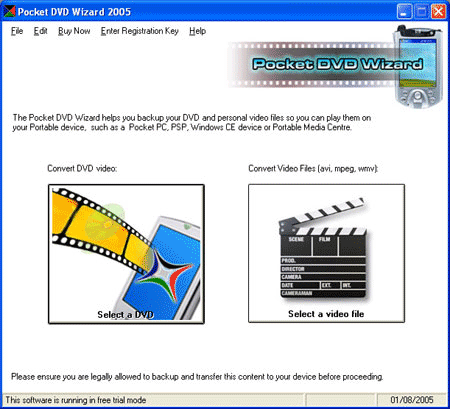
| | Watch your DVD videos on your Creative Zen Vision and Vision:M When we first got the Zen Vision:M out of the box, it was hard not to compare it to the iPod Video. They are both very similar in size, our view is that the Apple iPod Video is easy to use, but the Zen Vision:M seems to have better video playback performance. Full Zen Vision:M support was added to the Pocket DVD Wizard in version 4.5, with specific optimized support added in 4.6, so if you have a Vision:M and you are using an older copy of the Pocket DVD Wizard, we recommend you upgrade to v4.6 for the best results (upgrades are free for registered users). With the Pocket DVD Wizard and your Creative Zen Vision:M, you can watch your DVDs in the office, on the plane, in the car or even on the beach (just watch the sand!). How hard is it to convert video and DVDs for the Vision and Vision:M ?It is very easy! Just download and install the free trial version, then click the 'Select a DVD button'. Choose the DVD you want to convert, then select the Zen Vision:M in the dropdown devices box and the Wizard will create a file you can play (and that has been optimized for) on your Zen. Once you have the output video file created by the Pocket DVD Wizard, simple attach your Zen Vision or Vision:M and use the Creative Media Explorer to add the video file to you media player. We strongly recommend using the Creative Media Explorer to transfer the file, and not Windows Media Player. Windows Media Player may convert the file again during the transfer, which not only takes longer but also reduces the quality of the output on your Zen. Using the Creative Media Explorer to add the file is faster and retains the original file quality.
Software Highlights... - The Pocket DVD Wizard works on PC's running Microsoft Windows, and is very easy to use.
- You can fit over 90 minutes of DVD video on a single 128mb memory card.
- You only need one piece of software, the Pocket DVD Wizard supports multiple output devices.
- A free trial version is available for download so you can 'try before you buy. (click here for the download)
- 'Black bars' at the top and bottom of the picture can be removed from standard widescreen videos.
- You can record multiple episodes to separate files without additional user interaction (and its easy to do!).
- You can enhance the video brightness for small device screens.
- You can select high speed, high quality or a balanced output - it's your choice.
- Alternate languages and subtitles are fully supported.
- Using the Wizard interface it's as easy as 1-2-3-done!
Tried and tested DVD conversionWhen you buy the Pocket DVD Wizard you are buying the very best because it has been tried and tested, and optimized from your Creative Zen, or any other mobile device you own such as an iPod video or Playstation Portable. We do not just work from 'technical specifications' as devices do vary, and while a conversion may work when working from the specifications alone, it would not be optimised for the device. You do not need to learn about different codecs, profiles or bit rates, forget about screens that vary in size and brightness or the audio capabilities of your device, we have already done all that for you. Simply select the device you own from the drop down box using the Wizard step by step interface. Its easy because its been designed that way.
Other Devices Supported by the Pocket DVD WizardWe are adding support for new devices all the time and as upgrades to the latest version are free, if in six months time you buy a new video player for your kids, or buy a new Pocket PC or Palm and would like to watch video on that, you won't need to buy a new piece of DVD conversion software for it. Some of the other devices supported include - Creative Zen Vision:M
- All standard and VGA Pocket PC devices
- Palm OS devices (including Treos)
- Sony Playstation Portable (PSP)
- Archos media players (e.g. AV700, AV500)
- Windows Portable Media Centers (eg Creative Labs Zen PMC / iRiver PMC)
- Windows smart phones (eg iJam / MPX) and 3GP video cell and mobile phones
- Windows CE handheld player.
- Apple iPod Video
- and more. Download the latest trial version for the full list.
If there is a device we do not currently support, but you would like us to add please let us know. The trial version of the Pocket DVD Wizard lets you to convert 5 minutes of DVD video free so you can see how easy the software is to use, and just how good the results are! Why not give it a try now? |
| | Pocket DVD
| DVD to Creative Zen Vision |
|
| | |  | RegNow Secure Ordering - 100% Secure Purchase | The order process is protected through a secure connection.Your personal data is encrypted and cannot be accessed by a third party.
We do not record your credit card information. | | You can select the payment type such as credit card, switch/solo, bank/wire transfer, check, cash. |  |
|
| |
Pocket DVD , DVD to Creative Zen Vision |
| |
| |
| | Highlight |  | | Video
Converter | | WinAVI Video Converter support almost
all formats of video including AVI, MPEG1/2/4, VCD/SVCD/DVD, DivX, XVid, ASF,
WMV, RM, QuickTime MOV, Flash SWF. Also, it allows you to burn to VCD/SVCD/DVD.
A powerful AV compress engine can complete a whole AVI movie conversion and burn
it to DVD just in 1 hour. |
|  | |
|


 |
| Just In |
| Cucusoft
YouTube Mate (Downloader + Player + Converter, all in one)
A free YouTube Download and playback software. |
| |
Audio
Converter / CD Ripper
Convert audio between 16 formats.
Quickly grab audio from cd to any format.
Select between any of the following formats:-
mp1, mp2, mp3, wma, wav, avi video, ogg vorbis , mpc, mpeg. |
| |
| Pavtube
Video DVD Converter Suite is the most powerful multimedia
conversion tool that includes two outstanding multimedia applications:
Pavtube DVD Ripper, Pavtube Video Converter. |
| |
| Pavtube
DVD to PSP Converter is the powerful software that can
convert DVD to MP4, MP3, AAC, M4A and WAV with fast speed and brilliant
output quality. |
| |
| Pavtube
DVD to Apple TV Converter is easy to use yet powerful software
that can convert DVD to video formats including MP4, MP3, AAC, M4A,
and WAV. |
| |
| Pavtube
DVD to iPhone Converter is the powerful iPhone DVD conversion
tool. |
| |
| Pavtube
DVD to 3GP Converter is the powerful software for ripping
DVD to video formats including 3GP, 3G2, MP3, and AAC. With it, you
can enjoy your favorite DVD movies on your cell phones fast and freely.
|
| |
| Pavtube
DVD to Zune Converter is powerful DVD ripping tool for
Zune, which enables you to convert DVD to Zune video and audio formats
including DVD to WMV, DVD to MP4, and DVD to WAV, AAC, M4A, and MP3
with ease. Besides, it has more attractive functions. |
| |
| Pavtube
DVD to iPod Converter is powerful DVD conversion software
for Apple iPod. With it, you can easily convert DVD to iPod video
(MP4) format with highest speed and great output quality. |
| |
| Pavtube
DVD Ripper is easy-to-use and powerful DVD ripping software.
The DVD ripper can convert DVD to various video and audio formats,
ripping DVD to AVI, MPEG, MP4, MOV, 3GP, WMV, 3G2, WMA, MP3, etc.
|
| |
| Pavtube
DVD Copy creates perfect DVD copies every time. It is the
clear leader in the DVD copier market, ease to use, quality of DVD
copying (final product,) and reliability. |
| |
| Pavtube
Video to PSP Converter is the conversion tool to convert
video to PSP so that you can enjoy videos on PSP freely. |
| |
|
Pavtube Video to Apple TV Converter
is a professional conversion tool, which can convert most videos to
MP4, MP3, AAC, M4A, WAV, file with wonderful quality and fast speed. |
| |
|
Pavtube Video to iPhone Converter
is a versatile iPhone converter, which can convert most videos to
MP4, MP3, AAC, M4A, and WAV formats for playback on iPhone. |
| |
|
Pavtube Video to 3GP Converter is
a professional conversion tool, which can convert most videos to 3GP,
3G2, MP3 and AAC file with wonderful quality and fast speed. |
| |
|
Pavtube Video to Zune Converter can
convert all popular video and audio formats to Zune supported formats
in high quality. |
| |
|
Pavtube Video to iPod Converter is
a powerful conversion tool especially for the video playback on iPod.
|
| |
| Pavtube
Video Converter is all-in-one video converter software.
|
| |
| Aniosoft
iTouch iPhone to computer you can easily backup your songs
, videos from your iTouch iPhone back to your PC. |
| |
| Aniosoft
iPod Music Smart Backup is the best easily tools for iPod
transfer tools. |
| |
| WinAVI
Video Convertr - convert all the popular AV formats, at
an unmatchable speed and high quality. Supports burning. A must have
for anyone who downloads video files of the internet. |
| |
|