MP3ToWAV.ORGHomeSearch MP3ToWAV.ORGSoftware DirectoryTechnical CenterContact MP3ToWAV.ORG
Today's Pick
iPod Video Converter Suite
Editor Pick - iPod Video Converter Suite
an all-in-one iPod video Conversion solution + DVD to iPod
The 7th generation DVD to iPod Converter released
Paypal available
Now Available - PayPal as Customer Payment Option
 
Windows Product
 
DVD Ripper
Ultimate DVD + Video Converter Suite
WinXMedia DVD Ripper
DVD to MP4 Converter
 
YouTube Tools(New)
YouTube Video Converter
YouTube to iPod Converter for Mac
Cucusoft YouTube Mate
 
Mobile Video
Video to 3GP Converter
iPhone Video Converter Suite
DVD to Mobile Video Suite
3GP Video Cnverter
 
DVD to iPod
iPod Video Converter Suite
DVD to iPod Converter
DVD to MP4 Converter
WinAVI iPod/PSP/3GP/MP4 Video Converter
 
Mobile Music
iPhone Video Converter Suite
Audio To Midi
Mobile Music Polyphonic
Mobile Music Pro
RingTone Converter
Polyphonic Wizard
 
MP3 to WAV
MP3 WAV Converter
Audio Converter
Cool MP3 Converter
 
Video to iPod
iPod Video Converter Suite
AVI/MPEG iPod Converter
 
MP3/WAV to MIDI
Audio To Midi
Mobile Music Polyphonic
IntelliScore Polyphonic
 
Ra/RM/RAM to MP3
RA to MP3/WAV Converter
Audio Mid Recorder
 
DVD Burner
DVD-Cloner IV
DVD Santa
ConvertXtoDVD
 
Video Converter
WinAVI Video Converter
AVS Video Tools
ConvertXtoDVD
ImTOO MP4 Video Converter
 
Midi to MP3
MID Converter
Audio Mid Recorder
 
RM to MP3
Audio Converter
Real Converter
 
MP3 to RM
MP3 RM Converter
Audio Converter
Real Converter
 
WAV to MP3
MP3 WAV Converter
Audio Converter
WAV MP3 Converter
 
All-in-One
Blaze Media Pro
Virtuosa Gold
CD-DA Extractor
 
Midi to WAV
MID Converter
Audio Mid Recorder
Sound Recorder XP
 
CD to MP3
Free CD Ripper
CD to MP3 WAV Maker
Audio Converter
 
Audio Recorder
Audio Mid Recorder
Audio Record Wizard
Sound Recorder
 
Music files Search
Mp3 Explorer
P2P Music Jukebox
 
MP3 Tag Editor
Audio Converter
Ultra Tag Editor
MP3 Tag Clinic
 
MP3 to RM
MP3 RM Converter
ALO Audio Center
CD To RM Ripper
Real Converter
 
MP3 Management
Organizer MP3
Virtuosa Gold
Media Box MP3 Workstation
MP3 Tag Clinic
 
MP3 Sound Editor
MIDI Maestro
Audio Editor
AudioEdit Deluxe
 
Burn Audio CD
Audio CD Burner
Audio CD Maker
Media Convert
 
Burn MP3 CD
AVS Audio Tools
MP3 CD Burner
Audio CD Maker
 
CD to WAV
Easy CD Ripper
Easy CD-DA Extractor
CD to MP3 WAV Maker
 
Other Tools
Web Player Pro
Cool Paint
AV VoizGame
HiDownload Pro
World TV on PC
Backup Plus
SubmitWolf
Linux Product
All-in-One
Gear PRO for Linux
Mac Product
Burn DVD for Mac
Video Conveter for Mac
iPod to Mac
Security Software
Spyware Doctor
Registry Mechanic
Spam Monitor
SpyNoMore
Fx Audio Editor 4
Featured
Software Features:

1. Graphical Interface
2. Mouse Operations
3. Recording
4. Play and Record
5. CD Burner
6. Automatic Gain Control
7. Command Line
8. Audio Formats
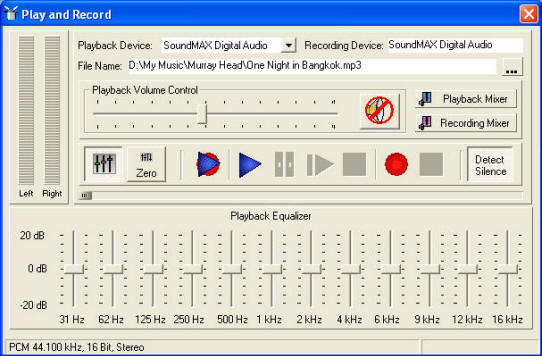
9. Graphics Equalizer
10. Function Keys
11. File Info
12. Limitations
13.Open with...
14. Copyrighted Material
15. Ripping CD's
16. Setup
17. Tool Box
18. Glossary

Graphics Equalizer

When enabled, the 12 band equalizer applies effects to the selected array of samples. When stereo files are loaded, equalizing effects can be applied to either track individually or both tracks simultaneously. For details of how to select one track or both tracks, see Mouse Operations.

Functionally the equalizer is like extended bass and treble controls. Bass is the lower frequency range of a sound from about 250 Hz down while treble is the higher frequencies in a signal above 6K. The bands between are called mid-range.

The sliders that control each of the frequency bands are graduated into decibels.

The range of decibels is set with the slider pictured on the left. The maximum range is ?92 dB and the minimum setting is ?0 dB.

Although audio volume does indeed vary between -92 dB and +92 dB, the practical setting is between ? 15 and ?20 dB.

Changes made to the sliders are not reflected in the waveform until the Apply button is pressed. If you play back the selection after applying the equalizer and don't like the results just press the undo button to revert to the previous state. The sound file is not permanently changed until saved to disk.

The equalizer in the play and record tool behaves a bit differently insofar as it will dynamically alter the audio frequency bands of a sound file during playback and cannot permanently change the file being played.

Main Functions:
Fx Audio Editor Series 4Edit AudioSound Editor
Audio ConverterSound ConverterConvert Music
Music EditorRecord SoundRip CD
Graphics Equalizer  
Purchase:
RegNow Secure Ordering - 100% Secure Purchase
The order process is protected through a secure connection.Your personal data is encrypted and cannot be accessed by a third party.
We do not record your credit card information.
You can select the payment type such as credit card, switch/solo, bank/wire transfer, check, cash.

Fx Audio Editor Series 4 Graphics Equalizer , Edit Audio , Sound Editor , Music Editor , Record Sound , Rip CD , Audio Converter , Sound Converter , Convert Music

Highlight
Highlight - Video Converter
Video Converter
WinAVI Video Converter is software for video conversion. By using our product, users are released from the limitations and difficulties of video formats. It can support almost all formats of video including AVI, MPEG1/2/4, VCD/SVCD/DVD, DivX, XVid, ASF, WMV, RM, QuickTime MOV, Flash SWF. Also, it allows you to burn to VCD/SVCD/DVD.
Convert, split, join, remove commercials, edit, rotate, apply effects, capture, transfer, copy, rip and burn DVD and video files!
Most Popular
1.Audio To MIDI
2.iPod Video Converter Suite
3.DVD Santa
4.DVD-Cloner VI
5.iPod Video Converter for Mac
6.iPod Movie Video Converter
7.Audio Mid Recorder
8.WinAVI Video Converter
9.MP3 WAV Converter
10.PSP Video Converter
Editor's Choice Anti-Spyware
PC World BEST BUY
Microsoft CERTIFIED Partner
Just In
Xilisoft AVI to SWF Converter - Convert AVI videos into SWF formats with Xilisoft AVI to SWF Converter. SWF video file formats are used not only to attach on HTML pages but also for sharing on Internet-enabled desktops, handsets and mobile devices with Flash Player installed. Users can create SWF video file from pictures as well. The converter automatically splits a large video file, enabling the output SWF video not to exceed 16,000 frames.
 
Xilisoft MTS Converter - can convert H.264/MPEG4 AVC HD videos (*.m2ts, *.mts) recorded by AVCHD camcorders to other HD video files including AVI HD, H.264 HD, MPEG2 HD MPEG, MPEG2 HD MPG, MPEG4 HD and MOV HD, as well as convert them to AVI, MOV, MP4, MPEG1, MPEG2, MPEG4/H.264, M4A, MP3 files, thus makes it possible to play them on PC or multimedia devices. This MTS converter allows you to customize output files to satisfy multiple requirements.
 
Xilisoft FLV to SWF Converter - can convert FLV video files to SWF files for embedding into HTML pages. You can now watch and share them on almost all Internet-enabled desktops, handsets and mobile devices with Flash Player installed. This FLV to SWF converter can create SWF video file from JPG, PNG, BMP, and GIF pictures as well. Moreover, it automatically splits large files every 16,000 frames to assure you of seamless video playback.
 
WinAVI FLV Converter - is an easy-to-use converting software for FLV and other popular video formats conversion. It supports to convert FLV from various video formats like AVI, WMV, RM, RMVB, iPod, MP4, PSP..., and vice versa. Besides, it also supports to capture FLV from internet (building in MS IE) and convert to all popular video formats. It has an unmatchable speed and high quality.
 
Xilisoft FLV to MOV Converter - can batch-convert several FLV video files to QuickTime MOV format at super fast speed, while still maintaining the high video and audio quality. Create MOV video from pictures (JPG, PNG, BMP and GIF), which is compatible to play with QuickTime player. Change the default output file settings according to your preferences: display resolution, bit rate, file size and quality.
 
Xilisoft FLV to MPEG Converter - provides you with the fastest and easiest way to convert FLV to MPEG1 and convert FLV to MPEG2 video files in batches for burning them to VCD/DVD disc. You can also make photos in different formats into MPEG video file. This FLV to MPEG converter allows you to output MPEG1/MPEG2 video files with different resolutions, bit rate, file size and quality by adjust various output parameters.
 
Xilisoft FLV to WMV Converter - Convert FLV to WMV video format with Xilisoft FLV to WMV Converter, so you can play them on your computer's default media player or on multimedia devices such as Zune, Xbox or on Windows Mobile-enabled gadgets. Moreover, this converter can turn your pictures into WMV videos. Additional features include splitting a single file into several smaller ones and setting your preferred file parameters such as bit rate, file size and video codec.
 
Xilisoft FLV to 3GP Converter - Watch movies on your mobile phone anytime anywhere by converting movies and videos from FLV to 3GP with Xilisoft FLV to 3GP Converter. Convert in batches for faster processing - dual-core and multi-core CPU supported. Change the default settings for the output file to get custom 3GP videos; split a large file, extract a certain video segment you prefer or adjust other advanced parameters.
 
Xilisoft MOV to MP4 Converter - With Xilisoft MOV to MP4 Converter, you can easily convert MOV to MP4 video file, MOV to MPEG-4/H.264, QT to MP4 and QT to MPEG-4/H.264 and make photos in popular formats into MP4 video in batches at high speeds on multi-core CPU. The program allows you to freely split a large file, customize the output file size, extract your favored video segment, and do much more customizations for making personalization to output MP4 video files.
Site Links
Home | Search | Directories | New Release | Tech Center | Contact US
©2002 - 2010 MP3 TO WAV.ORG