Audio files, like all other computer data files, are stored in a binary table which is a series of zeros and ones representing data bits. To distinguish file type and to provide instructions to audio software, most sound files begin with a block of data called the file header. Some audio file are also "wrapped" or "tagged" to provide additional features or licensing information. File extensions vary by file type and by the program that created or uses them. Unfortunately it has become common practice in digital audio to use such a wide variety of file extensions for essentially the same formats that in many cases there is no way to know the actual file format or the codec short of opening the file.
When you double click on a sound file your Windows operating system first reads the file extension and then calls the appropriate executable program (EXE), usually a player, to open the file. The executable program first reads the source file header to determine how to interpret the binary data such as the compression method, the sampling rate and other properties that the program needs in order to play or otherwise manipulate the contents. Some software producers use proprietary file extensions for common file types so you cannot always tell the file's format from the file extension. See Opens with... for more.
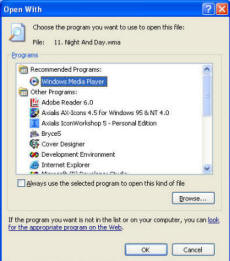 | Exactly which player opens a certain file extension is determined by the Windows MIME type that was created when the player was installed or with the Open With dialogue as shown on the left. Common formats, such as WAV files, might open with any number of players or software packages but Windows will always choose the default application unless you choose the Open with.. option. 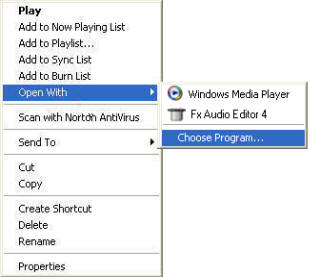
|
When the program opens a specific sound file, if it finds that the file header is valid and that the audio data matches the expected criteria, the data will be decompressed if necessary, and then loaded into memory where it can be played or manipulated.
The illustration below represents 3 samples of 8-bit PCM audio which are the zeros and one's that we mentioned at the beginning of this section.

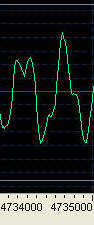 | Your sound card, via a software interface, interprets the 1's as switches that turn bits on or off. One is on producing voltage and zero is off producing no voltage. Each group of eight bits is a sample. Exactly how many samples are employed to produce audible sound depends entirely upon the quality of the recording. For example, the image at the left represents 1000 samples of MP3 audio wherein 128,000 bits equals one second of sound. The term for this ratio between samples and time is the audio sample rate. Therefore if the sample rate for the snippet to the left is 128 kbps, the playing time is 0.0078125 seconds. |
It is important to note here that the higher the sample rate (the number of bits in each second of sound) the higher the fidelity of playback and the higher the disk space requirement. Thus there's always a trade-off between quality and resources.
The following audio formats are directly supported within Fx Audio Editor. We'll talk briefly about each.
Uncompressed WAV PCM
Compressed WAV (ADPCM, GSM, DSP and others)
MP2 (MPEG 1/2 Layer-2)
MP3 (MPEG 1/2 Layer-3)
VOX (Dialogic ADPCM)
WMA (Windows Media Audio 9)
RAW audio (PCM, A-LAW, U-LAW)
MPC (MusicPack)
AVI (audio track)
Ogg Vorbis (Version 1.0)
G.721, G.723, G.726
AIFF, AIF (Apple audio format)
AU (Sun UNIX audio format).
CD audio (CDDA)
Uncompressed WAV PCM (Pulse Code Modulation) is the primary, generic method used for storing uncompressed digital audio. PCM is used in CD Audio and DAT. Typical file extensions are WAV, AIF, AIFF and PCM. As we saw in the illustration above, PCM is a one for one representation of pure binary data.
DPCM (Differential Pulse Code Modulation) is a form of compression that stores the value of the first sample as a benchmark and then stores the differences between each consecutive sample. Because DCPM compression uses only 4 bits to store the difference rather than the 8 bits required for PCM data, an 8-bit PCM file is compressed at 2:1 resulting in a file half the original size. When applied to16-bit PCM the result is a 4:1 compression ratio. This type of compression is known as lossy meaning that some quality is lost in the process.
ADPCM (Adaptive Differential Pulse Code Modulation) uses an algorithm to analyze blocks of samples then stores the first bit of major changes and a key that can predict the values of a number of the following samples. Compression is quite good when the audio in a particular file fits the expected criteria but poor when the sound in the file is very complex.
MPEG, MP2, MP3, (ISO/CCITT Moving Pictures Expert Group JTC1/SC29/WG11) the standard includes MPEG-1 or MPEG-2 Layer 2 and Layer 3 audio more commonly known as MP2, MP3 as well as AAC Audio. MPEG compression is based upon the concept of removing all sound that cannot be heard by the human ear to include overlaps where one sound cancels another. The compression ratio is excellent with little reduction in quality.
VOX (Dialogic ADPCM) format is optimized for human voice and is widely in telephony applications. Compression is 4:1, all files are mono with no header so they must be saved using the VOX file extension.
RAW audio, A-Law and µ-Law or CCITT standard G.711, is a compression standard used in telephony applications. u-Law and A-Law are very similar where u-Law is found primarily in European telephone systems. This compression ratio is 2:1 while producing higher quality and speed than 4-bit ADPCM formats.
AVI (Audio Video Interleave) is the native Windows movie format. With Fx Audio Editor you can open AVI files and save the audio tracks to other sound formats.
Ogg Vorbis (Version 1.0) is an open source audio codec designed to compete with MP3.
G.721, G.723, G.726 were all designed for human speech and telephony applications such as answering devices, call centers and voice mail.
AIFF, AIF (Apple audio format) not to be confused with Apple QuickTime, AIFF is the Apple native format as WAV is to Windows.
AU is the native Sun UNIX audio format.
CD audio (CDDA), the Redbook audio format for compact disk.
To edit unsupported formats the files must be played in their respective players and recorded in Fx Audio Editor (see Opens with...) and saved to a new file name. All tags and wrapper information will be lost by this process.